

The Bluestack app reader of the start with the same name from California is a free emulation software based on the virtual box and with which it is possible to perform Android apps under Windows and MacOS. The program creates a virtual machine in which an Android system is started. Blue Stacks then perform mobile programs on this. In this way, for example, you can also use WhatsApp Messenger on the desktop or play as Pokemon go to the big screen. We took a closer look at the player and the show in our test relationship if the installation is actually worth it.
How does the free download differ from the paid version for?
You can also download any number of apps with the free Bluestacks version. However, this contains advertising that you can get rid of the pro version only by updating.
Can I manage Bluestacks on an older computer?
Basically, the app player does not work on current devices. On his official homepage, however, the manufacturer stresses that the operation can lead to performance problems, in particular on older devices.
How can I install new apps with Bluestacks?
The app player can access various App Stores, including Google Play or Amazon App Shop.
1. Bluestacks 4 in the test: system requirements
When Minimum system requirements For the new version 4, Bluestacks indicates the following specifications:
- Operating system: Microsoft Windows 7 (32 bit or 64 bit) or higher
- PROCESSOR: Intel or AMD
- RAM: 2 GB
- HDD: Free 5 GB 5 GB strict disk memory
- The latest drivers of the Microsoft graphic card or the respective producer
- Rights of the administrator
The app player works substantially on systems that meet the minimum requirements, For a regular, safe and above all liquid operation, the following specifications are recommended:
- Operating system: Windows 10 (64 bit)
- PROCESSOR: Intel or AMD multi-core processor with a single «Passmark score» thread of over 1,000 points and virtualization activated in the BIOS. You can understand the single thread «Passmark score» for your CPU here.
- Graphics card: Intel/ Nvidia/ ATI, GPU on board or dedicated map, with a «passark score» of at least 750 points. You can find the single thread «Passmark score» for your GPU here.
- RAM: at least 8 GB
- HDD: SSD or a fusion/hybrid hard drive
- The latest drivers of the Microsoft graphic card or the respective producer
- Rights of the administrator
- Large bandwidth internet connection for access to games, account etc.
2. Installation and operation
The BlueStacks App reader is available for download free of charge on the manufacturer’s website. With a double click on the installation file, start the configuration assistant, which leads you through the entire process and, in the first step, loads and extracts the installation files (about 513 MB).
The emulator therefore starts as a separate window in the Windows or OS X operating system and asks you to register with your Google account on Google Play. Later I invite games and applications to your computer. You can also skip the step first and compensate for registration later.
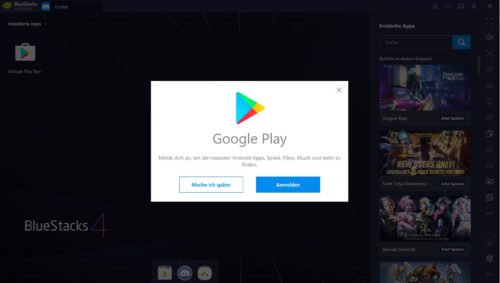
Good to know: If a virus scanner is activated on the computer, it should be paused for the duration of the installation, since it can affect the installation of Bluestacks.
The touchscreen is simulated in Bluestacks using the mouse. Multi-touch and movement control is not possible, but in some cases it can be detected by the keyboard. In addition, there is also the possibility of occupying individual hotkey. You can get the @Sign from the connection «Alt + L.«. If I were to assign the United States keyboard»Qwerty«Use, use the» cropped monkeys «with the keys»Shift + 2“.
In order to optimally adapt control to individual games for games, there are a series of touches in Bluestacks that you can pull on the game area with the mouse. In addition to functions such as «reversal», «shake» or «clean», a similar D-Pad control is also possible
2.1. Install apps and games
There are several ways to install an app. In addition to Google Play Store, the App Player can also access the Amazon App Store or the Bluestacks store in -house. The download and import therefore works exactly as you already know from your smartphone or tablet.
Alternatively, the installation can also be made using the APK file («Android application package»):
- Just save the package at the local level or on an external data carrier.
- Click on the three -point menu (next to the header «Apps installed«) And away»Install apk“.
- So go to your apk file in the Explorer and confirm with «Open“.
3. What functions do the BlueStacks offer 4 app players?
In Bluestacks, different apps can be started simultaneously using cards and even used for these different Google accounts. Thanks to the integrated app center, compatible apps and games can be found faster. In the information bar on the right side, the player presents the most interesting apps of various genres (including role -playing games, strategy, simulations of runs or actions) ordered in the categories «Popular«,»Sales shots» AND «Tendencies“. By clicking on the preview, you are branched directly on the pertinent page. There you can install them or look for apps or games inside the store.
The screen size is variable and can be adjusted to the sight of smartphones or tablets. The content of the screen can also be recorded if necessary or transmitted as live streaming on Facebook or Twitch. And the screenshots are obviously possible even at any time. In the extensive settings, you also have the opportunity to set the profiles of the devices for the Bluestacks request and to define a mobile phone provider. In this way, games for which a mobile network is mandatory.
3.1. Social Networks not rooted Android
Above Discord Contact your friends for voice chat, video or text. You can register through the browser or app developed for this purpose. On the contrary, it will be in the gift center: Here, users receive exclusive game content for individual titles or can take part in campaigns and bonus competitions.
On purpose: With Bluestacks you can also simulate and use a roototic Android smartphone. The following video shows exactly how it works
4. Conclusion: Here’s how the player of the BlueStacks app cuts in our test
For our test, we installed Bluestacks App Player 4.0 on an Acer Nitro 5 with an Intel Core i7-9750h (2.59 Ghz), 16 GB of RAM and a Nvidia GeForce GTX 1650 and has downloaded and installed running champions and Draghi Super Mario.
Although we did not get the game with the legendary hydraulic (the beginning was broken again and again), the hero’s epic was pleasantly liquid. Even the change between different views of the screen and resolutions did not affect the overall performance and there was no drop in the system.
With a good corresponding hardware equipment, playing on the emulator makes you really mood. In addition, this also convinced us with the simple configuration and direct connection to the various stores.
- Easy installation, intuitive operation
- Installation of apps from the Play Store or from the Amazon App shop possible
- APK installation possible
- Also available as a portable version
- not compatible with all apps
- The free version contains advertising
latest posts published

Lokky, the Italian data driven insurtech for professionals and SMEs
An ally for cyber security: Load Balancing
Business Trend 2023 for SMEs, professionals and commercial activities
Occupational risks for pastry shops
How to read a pay slip
What are the most common cyber risks and how to protect yourself
Clinical Risk: What it is and What are the consequences
Commercial activities most affected by theft
October is European Cyber Security Month